
TIPS from pear ★ by pear-60
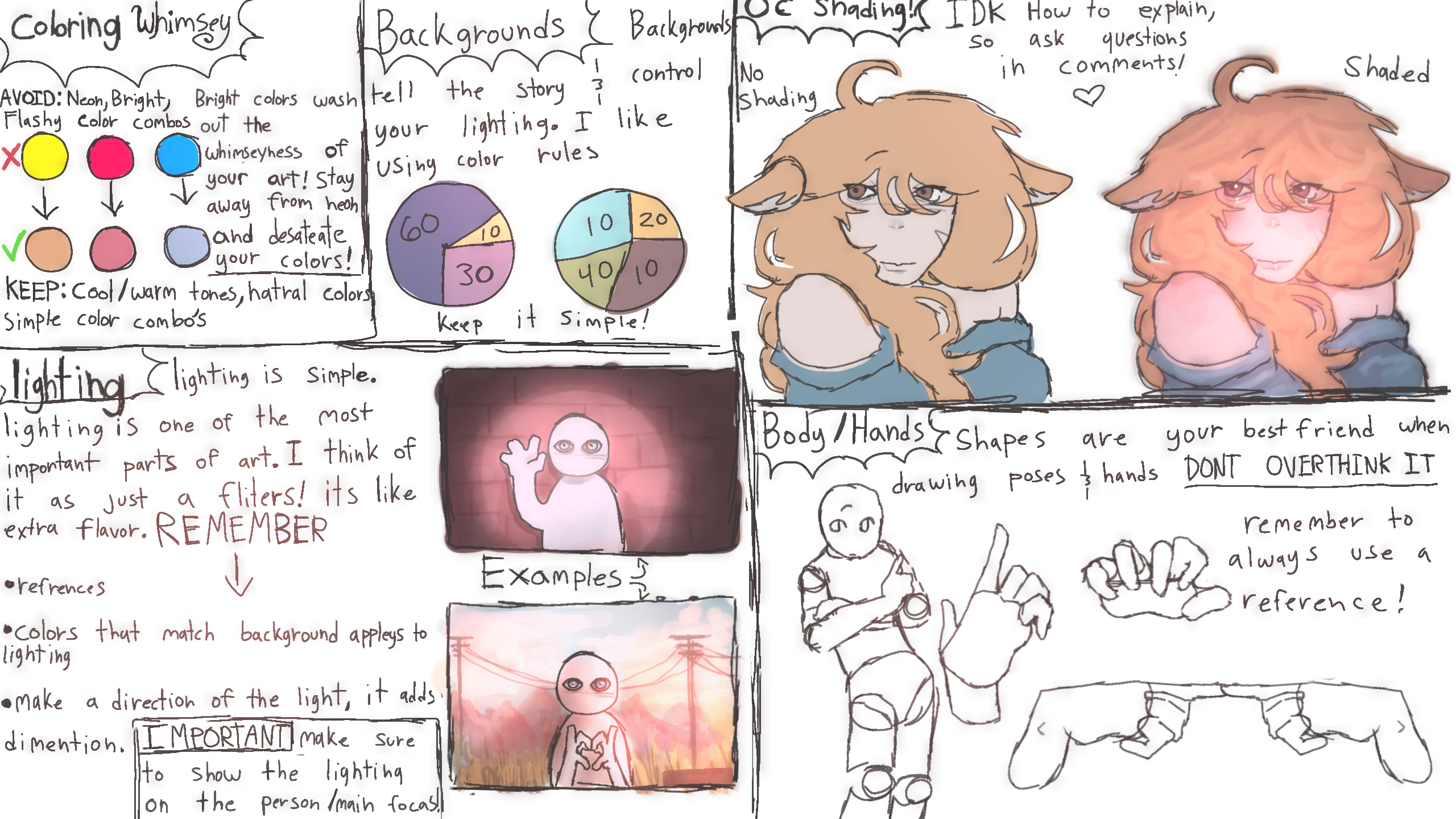
note: i use the lightning tool A LOT so thats how i get the looks of lighting
any questions ask in comments
sorry if i missed spelled anything, im bad at English writing :sob: or any-
#tips #tut ??
Comments
9+
like
reference image
eraser
eyedropper
time taken
nsfw
flip
undo
paint with friends
private
used tools icons
500
100
25
5
1
The comment has been reported
The Colors! Gallery moderators will look at it as soon as possible.
delete comment?
just delete
delete comment and prevent this user from commenting on your paintings
report as inappropriate
confirm


Comments
26 Mar, 2026, 4:57 am
GOATED
26 Mar, 2026, 4:57 am
the shading part is more of rendering due to extra details, but ty for the tut!!!!
26 Mar, 2026, 5:07 am
for the shading part what color for the lighten tool for crisp and how did you do the red and blue thingy @pear-60
26 Mar, 2026, 5:08 am
ty for tut btw
26 Mar, 2026, 5:17 am
hmmm... i'll have to figure out how to try this in procreate (in my own style obviously)
im working on a huge project to go with my book so hopefully your tips help :D
26 Mar, 2026, 5:21 am
@cinapool it depends on the lighting/background what color i use for it. its kinda my signature thing i love it
26 Mar, 2026, 5:35 am
so if a light backround a lighish pick red idk
if dark backround like a goldish white? @pear-60
26 Mar, 2026, 5:45 am
@cinapool literally all of them :sob:
26 Mar, 2026, 5:47 am
do you mind if i try to the tut on the unshaded part?
26 Mar, 2026, 5:52 am
@sleepycat sure
26 Mar, 2026, 5:52 am
oke
26 Mar, 2026, 6:07 am
oop @pear-60 :sob:
26 Mar, 2026, 1:22 pm
i.like the little skin walker guy heh.
26 Mar, 2026, 1:28 pm
ooooooo yummy tut!!! tysm mother, i like seeing how to do this kinda stuff :angel:
27 Mar, 2026, 6:47 pm
OMG THIS HELPS A LOT DUDE!!!!!!